
Best Web Hosting for Beginners in 2026: Easiest, Cheapest & Most Reliable Picks
Affiliate disclosure: This article contains a referral link. If you purchase hosting through it, we may earn a commission at no extra cost to you. We only recommend services we’ve researched and genuinely believe deliver value.
Table of Contents
Building your first website is exciting — until you hit the hosting page and get hit with a wall of terms like NVMe SSD, dedicated IP, CDN, and cPanel, none of which mean anything if you’ve never done this before. Picking the best web hosting for beginners shouldn’t require a computer science degree, and in 2026, it genuinely doesn’t have to.
This guide cuts through the jargon and walks through exactly what a first-time website owner should look for, compares the most beginner-friendly hosts on the market right now, and lays out honest pros and cons — including the mistakes that trip up almost every beginner on their first purchase.
Stop sharing a server with 20 strangers.
Get cloud hosting built for one site — yours — with unlimited traffic, a free domain for the first year, and a 30‑day money‑back guarantee.
Claim Up to 80% Off + Free DomainWhat “Beginner-Friendly” Actually Means
Not every host that claims to be beginner-friendly actually is. Here’s what genuinely matters when you’ve never set up a website before:
- A simple, visual control panel — not a wall of raw server settings
- One-click installs for WordPress or a drag-and-drop website builder
- Real human support available 24/7, ideally live chat, not just email tickets
- A free domain name included, so you’re not paying separately in a second place
- A free SSL certificate, automatically applied — this is what makes your site show the padlock icon and “https”
- Clear, honest pricing with the renewal cost shown upfront, not hidden three clicks deep
- Room to grow — so when your site succeeds, you’re not forced into a painful migration
The #1 Mistake Beginners Make When Buying Hosting
The single most common mistake first-time website owners make isn’t picking the “wrong” host — it’s not understanding what they’re actually buying.
Many budget hosting companies are resellers. They don’t run their own infrastructure; they purchase bulk server capacity from a larger hosting company and then divide a single server across many unrelated customer accounts to sell at a markup. As a beginner, you have no easy way to see this from the outside — the price looks similarly “cheap,” the signup page looks similarly polished, but the underlying performance can be dramatically worse, because your site is quietly competing for resources with 15–20+ other, unrelated websites on the same box.
The fix is simple: buy from a provider that sells its own infrastructure directly, and check whether even their entry-level plans include unlimited bandwidth and clearly stated resource allocations rather than vague, unspecified “shared resources.” This single check will save most beginners more frustration than any other tip in this guide.
Best Web Hosting for Beginners in 2026 — Ranked and Compared
1. Hostinger — Best Overall for First-Time Website Owners

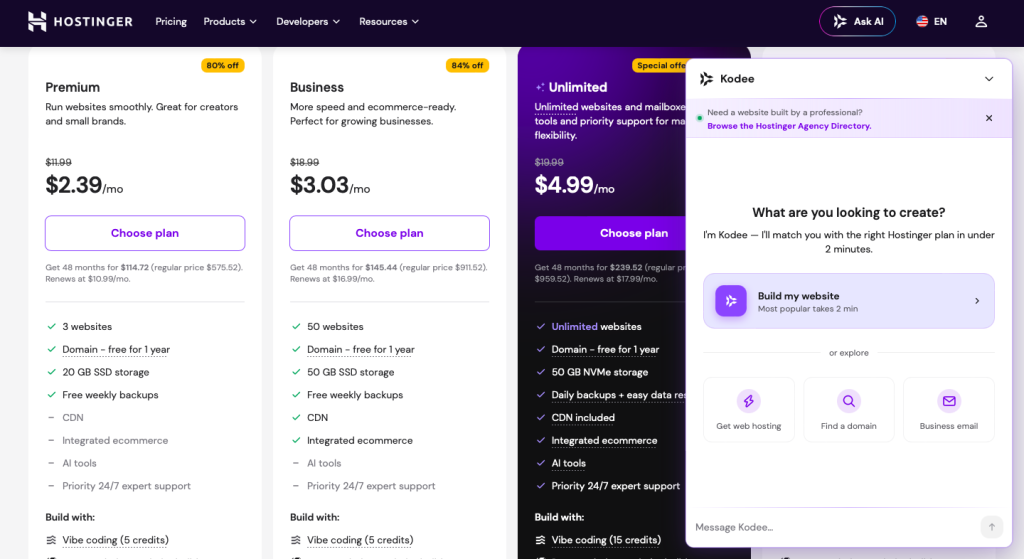
Hostinger is consistently ranked among the top picks for beginners across independent reviews in 2026, largely because it manages to be simultaneously the cheapest option in most comparisons and one of the easiest to actually use.
Pros:
- Built-in AI website builder that generates a working site from a short description — no coding required
- One-click WordPress installation with guided setup
- Free domain and free SSL certificate on annual plans
- 24/7 live chat support with genuinely fast response times
- Very low starting price that remains reasonably competitive even at renewal
- Simple, modern dashboard (hPanel) that avoids overwhelming first-time users
- 30-day money-back guarantee, so there’s low risk in trying it
Cons:
- No phone support on entry-level plans, live chat only
- Some advanced developer tools are hidden a layer deeper in the dashboard
- Higher-tier features (like dedicated RAM and dedicated IP) require the cloud plans rather than the cheapest shared tier
2. Bluehost — Best for Beginners Committed to WordPress
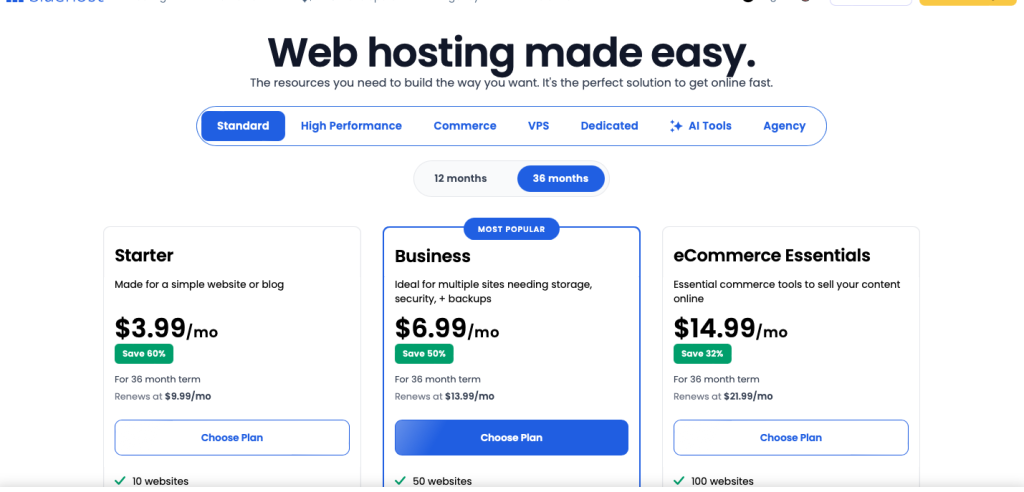
Pros:
- Deep WordPress integration with guided onboarding specifically for first-time WordPress users
- Officially recommended by WordPress.org
- Security features included automatically on all plans
Cons:
- Pricing is less competitive for anything outside WordPress-specific plans
- Steeper renewal price increases than several competitors
- Upsells appear frequently throughout setup
3. Wix — Best All-in-One Website Builder (No Separate Hosting Needed)
Pros:
- Simplest drag-and-drop experience on the market
- Free plan available to test before paying anything
- No separate hosting purchase needed — it’s bundled
Cons:
- Much harder to migrate away from later if you outgrow the platform
- Less flexibility for advanced customization down the line
- Free plan displays Wix branding and ads
4. IONOS — Best for Beginners Who Want a Dedicated Support Rep
Pros:
- Very low entry pricing
- Assigns a dedicated support contact to help with setup
- Scales smoothly if your site grows
Cons:
- Interface feels less modern and less intuitive than newer competitors
- Uses Apache rather than the faster LiteSpeed stack
5. DreamHost — Best for Reliability-Focused Beginners
Pros:
- Consistently strong uptime in independent testing
- Simple navigation with clear guided flows
- 30-day risk-free trial
Cons:
- Fewer advanced customization options for later growth
- Occasional connectivity/network reachability issues noted in testing
Quick Comparison Table
| Provider | Starting Price | Free Domain | AI/Drag-and-Drop Builder | 24/7 Support | Best For |
|---|---|---|---|---|---|
| Hostinger | ~$2.69–$2.99/mo | ✅ | ✅ AI builder | ✅ Live chat | Overall best for beginners |
| Bluehost | ~$2.99/mo | ✅ | Limited | ✅ | WordPress-committed beginners |
| Wix | Free plan / ~$16+/mo | ❌ (paid plans only) | ✅ Drag-and-drop | ✅ | Simplest possible setup |
| IONOS | ~$1.00–$2/mo | ✅ | Limited | ✅ Dedicated rep | Personalized guidance |
| DreamHost | ~$2.59/mo | ✅ | Limited | ✅ | Reliability-focused beginners |
Shared Hosting vs. Cloud Hosting: What Should a Beginner Actually Buy?
Most beginners start on shared hosting, and for a first personal site, portfolio, or small blog, that’s usually a reasonable starting point — it’s the cheapest way to get online.
But here’s the catch: not all shared hosting is equal. Some providers pack far more accounts onto a single server than others, which directly affects how fast your site loads for visitors. This is why it’s worth checking whether even the entry-level plan from a given host includes unlimited bandwidth and reasonably generous storage — vague “fair use” resource policies are usually a sign of an overcrowded server.
If you already know your site will need to handle real traffic — an online store, a business site, a growing blog — it’s worth paying slightly more upfront for a cloud hosting plan instead. Cloud plans allocate dedicated RAM and often a dedicated IP address specifically to your account, so your site’s performance doesn’t depend on what dozens of unrelated websites on the same server are doing at any given moment. For beginners planning to grow quickly, starting on a cloud plan from day one avoids a migration headache later.
Step-by-Step: What a Beginner Should Actually Do
- Pick a host with a free domain and free SSL bundled in so you’re not managing multiple separate purchases
- Use the one-click WordPress install or built-in AI builder rather than trying to configure a server manually
- Check the renewal price before you buy, not just the first-term promotional price
- Enable automatic backups the moment your site goes live
- Test live chat support once before you need it in an emergency, so you know what to expect
A Beginner’s Glossary: Hosting Terms Explained Simply
If hosting pages feel like they’re written in another language, here’s a plain-English translation of the terms you’ll run into most often while researching the best web hosting for beginners:
- Domain name — your website’s address (like yoursite.com). Usually purchased separately or bundled free with a hosting plan for the first year.
- SSL certificate — the technology that makes your site show “https” and a padlock icon in the browser bar. It encrypts data between your visitor and your site, and it’s essentially mandatory now for any site collecting information.
- Bandwidth/traffic — how much data your site can transfer to visitors per month. “Unlimited” plans avoid the risk of your site being throttled or suspended during a busy period.
- Storage — how much space your files, images, and databases can take up on the server.
- cPanel / hPanel — the dashboard you log into to manage your hosting account, install software, and check your site’s status.
- NVMe SSD — a fast type of storage drive. Hosts using NVMe SSDs typically load pages noticeably faster than those on older HDD storage.
- Dedicated IP — a unique server address assigned only to your site, rather than shared with other accounts.
- Uptime — the percentage of time your site is actually online and accessible. 99.9% uptime means roughly 8.7 hours of downtime per year; anything lower adds up fast.
- One-click install — a feature that installs WordPress or another platform for you automatically, without any manual server configuration.
What Should a Beginner Actually Expect to Pay?
Pricing confusion is one of the biggest reasons beginners either overpay or accidentally choose a host that doesn’t fit their needs. Here’s a realistic view of 2026 pricing for a first website:
- Domain name: Often free for the first year when bundled with a hosting plan; roughly $10–$15/year afterward
- Basic shared hosting: $2–$4/month on an annual plan promotionally, typically renewing around $7–$10/month
- All-in-one website builder plans (like Wix): Free to start, with paid plans from roughly $16–$27/month once you need a custom domain and full features
- SSL certificate: Usually free and automatic with any reputable host — you should never need to pay extra for this
A practical beginner budget for year one, including a bundled domain and basic hosting, typically lands in the $30–$60 range for the full year on a promotional annual plan — genuinely one of the lowest financial barriers to starting any kind of small online project.
Step-by-Step: Setting Up Your First Website From Scratch
Here’s what the actual process looks like, start to finish, without skipping the parts beginners usually get stuck on:
- Choose a host and select an annual plan that bundles a free domain and free SSL — this avoids managing two separate purchases and renewal dates
- Register your domain name during checkout, or connect one you already own
- Use the one-click WordPress installer or AI website builder to generate your starting site rather than building from a blank page
- Pick a theme or template and customize the logo, colors, and homepage text
- Add your core pages — Home, About, Contact, and whatever is specific to your project
- Turn on automatic backups in your hosting dashboard before you publish anything you’d be upset to lose
- Preview your site on mobile, since most visitors will see it on a phone first
- Publish, and test every link and form yourself before sharing the URL anywhere
Beginner Mistakes to Avoid When Buying Hosting
- Buying way more hosting than needed “just in case.” A basic plan is genuinely sufficient for a first site — you can always upgrade later without losing anything.
- Not checking the renewal price. The number on the homepage is rarely what you’ll pay in year two.
- Skipping backups. It costs nothing to enable them and can save your entire site after a mistake or an attack.
- Choosing a host with no live chat support. As a beginner, you will have questions, and email-only support with multi-day response times can turn a five-minute fix into a lost weekend.
- Assuming free website builders have no limits. Free tiers usually restrict custom domains, remove branding only on paid plans, and cap storage — read what’s actually included before building your whole site there.
- Ignoring whether the plan includes unlimited bandwidth. Some ultra-cheap plans throttle or suspend sites that get unexpected traffic spikes — exactly the moment you don’t want your new site to go down.
Frequently Asked Questions
Do I need to know how to code to build my first website? No. Modern beginner hosting plans include AI website builders or drag-and-drop tools, plus one-click WordPress installs with pre-built themes, so no coding knowledge is required to get a functional site live.
What’s the cheapest way to get a website online? A basic shared hosting plan with a bundled free domain and free SSL certificate is typically the lowest-cost entry point — usually a few dollars a month on an annual plan.
Should a total beginner buy cloud hosting or shared hosting? Shared hosting is fine to start with for a simple personal site. If you’re building something for a business, store, or anything traffic-sensitive from day one, a cloud plan avoids performance issues later.
How important is customer support for a beginner? Very. As a beginner, you will run into questions you can’t answer alone — 24/7 live chat support is one of the most valuable features you can have, especially in your first few weeks.
Can I switch hosts later if I outgrow my first plan? Yes, and it’s a normal part of a website’s growth. Most reputable hosts, including Hostinger, offer free or low-cost migration assistance to move your existing site over without losing content or downtime.
What’s the biggest difference between a website builder like Wix and traditional hosting with WordPress? Website builders bundle hosting and design into one simplified tool with less flexibility but almost zero setup. Traditional hosting with WordPress takes slightly more initial setup but gives you far more control, more plugin and design options, and an easier path to scale as your site grows.
Matching Your First Host to Your Project Type
Not every beginner is building the same thing, and the best web hosting for beginners for a personal blog isn’t necessarily the best fit for a first online store. Here’s a quick breakdown:
Personal blog or portfolio: A basic shared plan with a free domain and one-click WordPress install covers everything you need — prioritize ease of use and price over raw performance, since traffic will likely be light at the start.
First small online store: Even as a beginner, look for a plan that includes free SSL (non-negotiable for any site processing payments), unlimited bandwidth, and reasonable storage for product images — an ecommerce-ready plan from day one avoids a stressful mid-launch upgrade.
Local business or service website: A simple site builder or one-click WordPress install with a business-focused theme is usually enough. Prioritize reliable uptime and fast support over advanced features you won’t use yet.
Learning project or practice site: If you’re mainly experimenting and learning, a free or ultra-low-cost plan is perfectly reasonable — just be aware that free tiers often restrict custom domains and may display the provider’s branding until you upgrade.
In every case, the underlying advice holds: don’t overbuy for features you won’t touch in your first few months, and don’t underbuy on the fundamentals — free SSL, a real support channel, and automatic backups — that protect you regardless of what kind of site you’re building.
What Happens After Your First Site Is Live
Finding the best web hosting for beginners is really about the first six months, not just the first day. Once your site is up, a few habits make the biggest difference in how smoothly things go from here:
- Check your uptime and speed occasionally using free tools, so you notice a problem before your visitors do
- Keep your platform and plugins updated, since outdated software is the most common way beginner sites get compromised
- Watch your storage and traffic usage in your hosting dashboard so you’re never surprised by an upgrade prompt
- Reassess your plan every 6–12 months as your site grows — starting small and upgrading later is almost always cheaper than overbuying on day one
Most beginners who start on a well-chosen entry-level plan from a provider like Hostinger never actually need to switch hosts — they simply upgrade to a higher tier within the same dashboard as their site’s traffic grows, which is exactly the kind of low-friction growth path the best web hosting for beginners should offer from the very first purchase.
Bottom Line
For most first-time website owners in 2026, the best web hosting for beginners comes down to three things: a genuinely simple setup process, honest pricing that doesn’t spike dramatically at renewal, and support that actually answers when something goes wrong.
Based on current testing and pricing, Hostinger currently offers the strongest overall combination for beginners — an AI website builder, one-click WordPress installs, a free domain, 24/7 live chat, and pricing that stays reasonable even after the first term ends.
👉 See current Hostinger beginner hosting plans and pricing
This is an affiliate link — using it costs you nothing extra and helps support this site.
Best Web Hosting for Small Business in 2026: Full Comparison, Pros & Cons
Read More from SafeMe
What to Do When Facebook Hacking Happens | Step-by-Step Recovery Guide 2025
How to Get Financial Help for Hospital Bills
Crowdfunding for Surgery: How to Raise Funds Fast
Stop sharing a server with 20 strangers.
Get cloud hosting built for one site — yours — with unlimited traffic, a free domain for the first year, and a 30‑day money‑back guarantee.
Claim Up to 80% Off + Free Domain